Business Process Diagrams
导言
业务讨论中最常见的误区,不是图画得不够漂亮,而是用一张图回答了错误的问题。想确认执行步骤,却画满参与者和消息;想追踪订单状态,却用时序图枚举所有异常;想划分责任,却把普通泳道当作 BPMN 执行语义。
本文用同一个“电商订单履约”案例做受控比较:业务事实不变,只改变观察轴。流程图看步骤,BPMN 看参与者、事件和规则,泳道图看责任与系统,状态机看订单生命周期,时序图看系统调用。读完后,应该先能选择合适的图,再决定用什么工具绘制。
导言
业务讨论中最常见的误区,不是图画得不够漂亮,而是用一张图回答了错误的问题。想确认执行步骤,却画满参与者和消息;想追踪订单状态,却用时序图枚举所有异常;想划分责任,却把普通泳道当作 BPMN 执行语义。
本文用同一个“电商订单履约”案例做受控比较:业务事实不变,只改变观察轴。流程图看步骤,BPMN 看参与者、事件和规则,泳道图看责任与系统,状态机看订单生命周期,时序图看系统调用。读完后,应该先能选择合适的图,再决定用什么工具绘制。
导言
VeRL场景开发时,安装包特别多和复杂:
开发时还要pip install -e . 还要修改代码。
传统的思路是docker镜像或者conda打大包,但是这种包一个就是20GB+,但是这是商发时的策略,开发时即使只是修改一行,但是还是要重新出一个20GB大包。
思路是借助并加速pip的原子化构建:
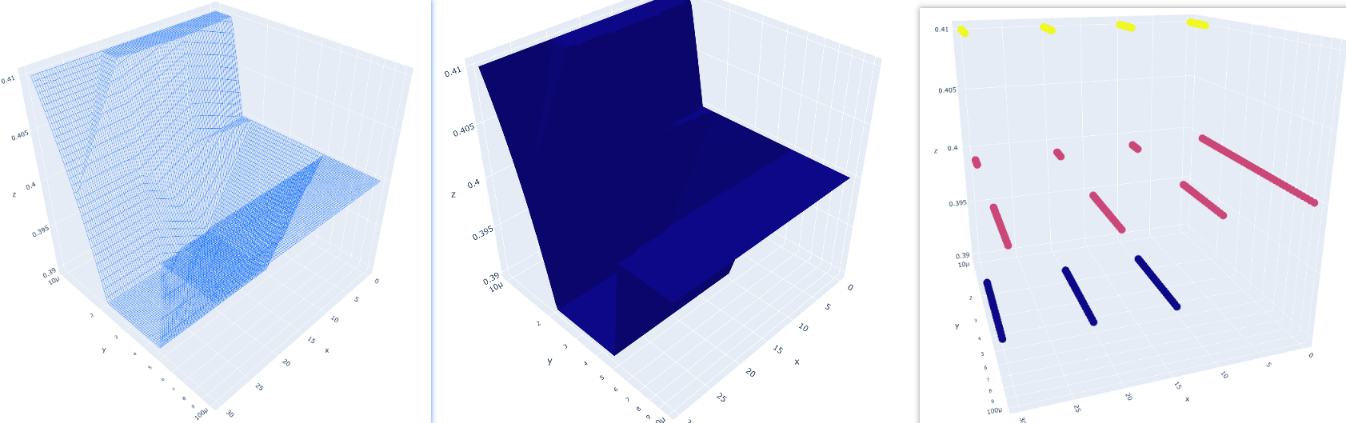
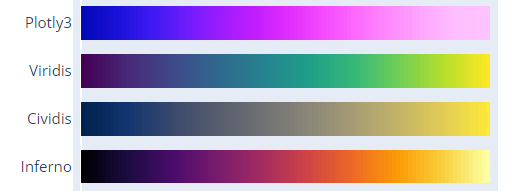
pip intall -r requirements.txt就行。https://plotly.com/python/builtin-colorscales/
same in matplotlib
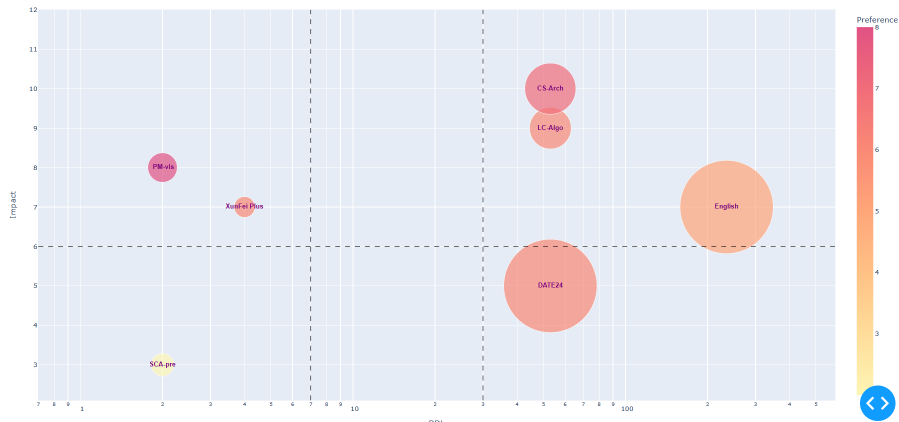
使用Dash: A web application framework for your data., 默认部署在localhost:8050端口
本地机器打通ssh隧道
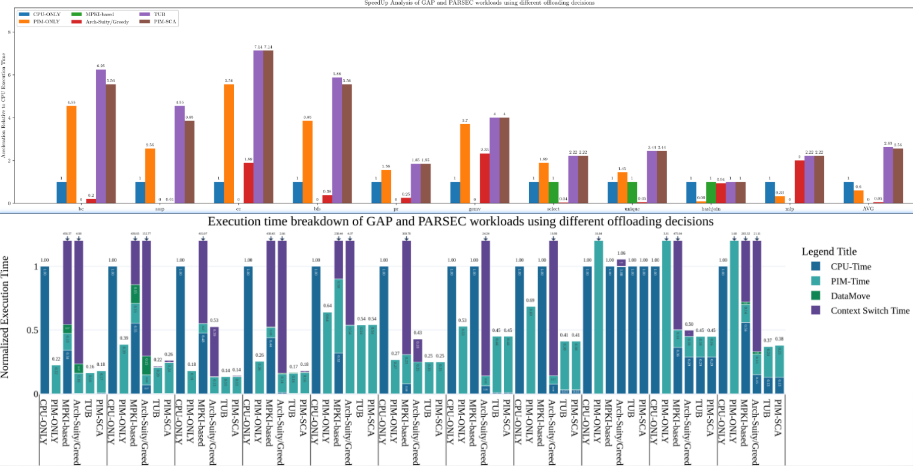
In scientific research plotting, it's always bar charts instead of line charts.
Possible reasons:
font things, Attention, global settings have higher priority to get work
matplotlib.rcParams.update({
"pgf.texsystem": "pdflatex",
'font.family': 'serif',
# 'text.usetex': True, # comment to support bold font in legend, and font will be bolder
# 'pgf.rcfonts': False,
})
# mpl
fig.set_size_inches(w= 0.5 * x_count * (group_count+1.5), h=5.75 * 0.8) #(8, 6.5)
# plotly
fig.update_layout(height=350, width=50 * graph_data.size(),
margin=dict(b=10, t=10, l=20, r=5),
bargap=0.2 # x tick distance, 1 is the normalize-distance of adjacent bars
)
# mpl: Adjust the left margin to make room for the legend, left & right chart vertical line position from [0,1]
plt.subplots_adjust(left=0.1, right=0.8)
# mpl:
x = np.arange(len(graph_data.x)) # the label locations, [0, 1, 2, 3, 4, 5, 6, 7]
# set the bar move to arg1 with name arg2
ax.set_xticks(x + (group_count-1)*0.5*width, graph_data.x)
plt.xticks(fontsize=graph_data.fontsize+4)
# Adjust x-axis limits to narrow the gap
plt.xlim(-(0.5+gap_count)*width,
x_count - 1 + (group_count-1)*width + (0.5+gap_count)*width)
# plotly
# mpl
ax.set_ylabel(yaxis_title,
fontsize=graph_data.fontsize,
fontweight='bold')
plt.grid(True, which='major',axis='y', zorder=-1.0) # line and bar seems need to set zorder=10 to cover it
plt.yticks(np.arange(0, max_y ,10), fontsize=graph_data.fontsize) # step 10
plt.yscale('log',base=10) # or plt.yscale('linear')
ax.set_ylim(0.1, max_y)
## highlight selected y-label: https://stackoverflow.com/questions/73597796/make-one-y-axis-label-bold-in-matplotlib
# plotly
fig.update_layout(
yaxis_range=[0,maxY],
yaxis=dict(
rangemode='tozero', # Set the y-axis rangemode to 'tozero'
dtick=maxY/10,
gridcolor='rgb(196, 196, 196)', # grey
gridwidth=1,
),
)
# mpl ?
# plotly: Add a rectangle shape to cover the entire subplot area
fig.add_shape(type="rect",
xref="paper", yref="paper",
x0=0, y0=0,
x1=1, y1=1,
line=dict(color="black", width=0.7))
# mpl: Create a bar chart with bold outlines
plt.bar(categories, values, edgecolor='black', linewidth=2)
# plotly: ?
# mpl:
ax.legend(loc='upper left', ncols=3, fontsize=graph_data.fontsize)
# legend out-of-figure, (1.02, 1) means anchor is upper right corner
plt.legend(loc='upper left', bbox_to_anchor=(1.02, 1), borderaxespad=0)
# Calculate the legend width based on the figure width
fig_size = plt.gcf().get_size_inches()
fig_width = fig_size[0]
# Move the legend to the center above the ceiling line
plt.legend(loc='upper center', bbox_to_anchor=(0.5, 1.1),
ncol=2, # ncol=2 to have labels in one line
frameon=False, # frameon=False removes the legend box outline
columnspacing=fig_width, # distance between each label
handlelength=1.0, # label-box width (unit is text fontsize)
handleheight=1.0, # label-box heigh (unit is text fontsize)
prop={'size': 20, 'weight': 'bold'} # text fontsize
)
# mpl: white hugo hatch with black bar edge.
# Problem: because the bug of mpl. hatch color follow the edge color
# Solved: draw bar twice, first the white hugo hatch with white bar edge. Second empty figure with black bar edge.
# white doubel ref: https://stackoverflow.com/questions/38168948/how-to-decouple-hatch-and-edge-color-in-matplotlib
# ref2: https://stackoverflow.com/questions/71424924/how-to-change-the-edge-color-of-markers-patches-in-matplotlib-legend
color_palette = ['black', (193/255, 1/255, 1/255), 'w', (127/255, 126/255, 127/255), 'blue']
pattern_list = ["", "/", "+", "\\", "x"]
edgecolor_list = ['w', 'w', (0/255, 176/255, 80/255), 'w', 'w']
ax.bar(x + offset, measurement, width, label=species_name,
color=color_palette[idx],
hatch = pattern_list[idx],
edgecolor=edgecolor_list[idx],
linewidth=1,
)
ax.bar(x + offset, measurement, width, label=species_name,
color = "none",
edgecolor='black', linewidth=1,
)
# related legend: https://stackoverflow.com/questions/71424924/how-to-change-the-edge-color-of-markers-patches-in-matplotlib-legend
handles1, labels1 = ax.get_legend_handles_labels()
plt.legend([handles1[2*idx]+handles1[2*idx+1] for idx in range(group_count)],
[labels1[2*idx] for idx in range(group_count)],
loc='upper center', bbox_to_anchor=(0.5, 1.12),
ncol=group_count, # have labels in one line
frameon=False,
# bbox_transform=plt.gcf().transFigure,
columnspacing=legend_width,
# handlelength=1.0,
handleheight=1.2,
prop={'size': graph_data.fontsize,
'weight': 'heavy'}
)
# plotly: find the overflow
overflow_pattern = ["/" if y > maxY else "" for y in entry[1]]
fig.add_bar(x=x,y=yList,
name=barName,
marker=dict(
color=color_list[i],
pattern_shape = overflow_pattern,
line=dict(color='black', width=2)
),
textfont=dict(size=graph_data.fontsize),
)
# legend
legend_num = len( barDict.items())
fig.update_layout(barmode="relative",
# legend_title="Legend Title",
legend = dict(
entrywidthmode='fraction', # https://plotly.com/python/legend/
entrywidth= 0.2,
x=0.5 - 0.5 * legend_num * 0.2, # Set x to 0.5 for the center
y=1.2, # Set y to a value greater than 1 to move it above the plot
orientation="h", # Display legend items in a single line
),
)
To draw symmetry chart, we need to special highlight the overflow bar number.
If the ancher point locate in the plot box, it's easy to show text above the ceil line using textposition="bottom" like option. In the opposite scenario, plotly and mathplotlib all will hide the out-box text.
# plotly
fig.add_annotation(
x=[x[0][i],x[1][i]], # 注释的 x 坐标为 "bc"
y=min(maxY,entry), # 注释的 y 坐标为该列的最大值
text=f"{entry:.2f}", # 注释的文本内容
# valign = "bottom", # text position in text box(default invisible)
yanchor = "bottom", # text box position relative to anchor
showarrow=False, # 显示箭头
# bgcolor="rgba(255, 255, 255, 0.8)", # 注释框背景颜色
font=dict(size=graph_data.fontsize+2) # 注释文本字体大小
)
# mathplotlib
# Create labels for overflowed values
for i, value in enumerate(values):
if value > maxY:
ax.annotate(f'Overflow: {value:.2f}', (i, maxY), ha='center', va='bottom', fontsize=12)
But mlb can write text out box.
ax.text(1, -1.6, 'Increasing', ha="center")
# first parameter is text, xy is the anchor point, xytext is the text,
# xytext 2 xy is a relative distance
ax.annotate('yahaha', xy=(0, -0.1), xycoords='axes fraction', xytext=(1, -0.1))
mathplotlib(mpl) can achieve this using ref, but there are few blogs about plotly.
# mpl: from 1*1 size full-graph (0.5,0.2) to point (1,0.8)
# transform=gcf().transFigure : gcf() stands for "get current figure," and .transFigure indicates that the coordinates provided in [0.5, 0.5], [0, 1] are in figure-relative coordinates. This means that the line's position is defined relative to the entire figure, not just the axes
# clip_on=False : This setting means that the line is not clipped at the edges of the axes. It allows the line to extend beyond the axes' boundaries.
from pylab import *
plot([0.5, 1], [0.2, 0.8], color='lightgreen', linestyle='--', lw=1 ,transform=gcf().transFigure, clip_on=False)
# mpl: arrow from xy 2 xytext
# xycoords='figure fraction' to Add annotation to the figure (full graph)
ax.annotate('', xy=(0, -0.1), xycoords='axes fraction', xytext=(1, -0.1),\
arrowprops=dict(arrowstyle="->", color='violet'))
# mpl:
ax.axhline(y=12, color='red', linestyle='--', label='Horizontal Line at y=12')
ax.axvline(x=3, color='green', linestyle='-.', label='Vertical Line at x=3')
# plotly ref: https://plotly.com/python/horizontal-vertical-shapes/
fig.add_vline(x=2.5, line_width=3, line_dash="dash", line_color="green") # dot
fig.add_hline(y=0.9)
如果防火墙是关闭的,你可以直接部署在external address上。使用docker也是可行的办法

import matplotlib.pyplot as plt
X = [str(i) for i in metricValue]
Y = accuracyResult
# 设置图片大小
fig, ax = plt.subplots(figsize=(10, 6)) # 指定宽度为10英寸,高度为6英寸
plt.plot(X, Y, marker='o')
plt.xlabel('Threshold Percentage(%)', fontsize=12) # 设置x轴标签字体大小为12
plt.ylabel('Average Execution Time of Static Method', fontsize=12) # 设置y轴标签字体大小为12
plt.title('Tuning load store pressure', fontsize=14) # 设置标题字体大小为14
for i in range(len(X)):
plt.text(X[i], Y[i], Y[i],
fontsize=10, # 设置文本字体大小为10
ha='center', # 设置水平对齐方式
va='bottom') # 设置垂直对齐方式
# 保存图片
plt.savefig(glv._get("resultPath") + f"tuning/{tuningLabel}/loadStorePressure.png", dpi=300) # 设置dpi为300,可调整保存图片的分辨率
plt.show() # 显示图片
plt.close()

在柱状图中,用于表示上下浮动的元素通常被称为"误差条"(Error Bars)。误差条是用于显示数据点或柱状图中的不确定性或误差范围的线条或线段。它们在柱状图中以垂直方向延伸,可以显示上下浮动的范围,提供了一种可视化的方式来表示数据的变化或不确定性。误差条通常通过标准差、标准误差、置信区间或其他统计指标来计算和表示数据的浮动范围。
Errorbars + StackedBars stacked 的过程中由于向上的error线的会被后面的Bar遮盖,然后下面的error线由于arrayminus=[i-j for i,j in zip(sumList,down_error)]导致大部分时间说负值,也不会显示。
fig = go.Figure()
# color from https://stackoverflow.com/questions/68596628/change-colors-in-100-stacked-barchart-plotly-python
color_list = ['rgb(29, 105, 150)', \
'rgb(56, 166, 165)', \
'rgb(15, 133, 84)',\
'rgb(95, 70, 144)']
sumList = [0 for i in range(len(x[0]))]
for i, entry in enumerate( barDict.items()):
barName=entry[0]
yList = entry[1]
ic(sumList,yList)
sumList = [x + y for x, y in zip(yList, sumList)]
fig.add_bar(x=x,y=yList,
name=barName,
text =[f'{val:.2f}' for val in yList],
textposition='inside',
marker=dict(color=color_list[i]),
error_y=dict(
type='data',
symmetric=False,
color='purple',
array=[i-j for i,j in zip(up_error,sumList)],
arrayminus=[i-j for i,j in zip(sumList,down_error)],
thickness=2, width=10),
textfont=dict(size=8)
)
类似股票上下跳动的浮标被称为"Candlestick"(蜡烛图)或"OHLC"(开盘-最高-最低-收盘)图表。
暂无
暂无
上面回答部分来自ChatGPT-3.5,暂时没有校验其可靠性(看上去貌似说得通)。
[1] Saket, B., Endert, A. and Demiralp, Ç., 2018. Task-based effectiveness of basic visualizations.IEEE transactions on visualization and computer graphics,25(7), pp.2505-2512.
全体选项其中一部分是Optimize-Options
编译时最好按照其分类有效组织, 例子如下:
g++
# Warning Options
-Wall -Werror -Wno-unknown-pragmas -Wno-dangling-pointer
# Program Instrumentation Options
-fno-stack-protector
# Code-Gen-Options
-fno-exceptions -funwind-tables -fasynchronous-unwind-tables
# C++ Dialect
-fabi-version=2 -faligned-new -fno-rtti
# define
-DPIN_CRT=1 -DTARGET_IA32E -DHOST_IA32E -fPIC -DTARGET_LINUX
# include
-I../../../source/include/pin
-I../../../source/include/pin/gen
-isystem /staff/shaojiemike/Download/pin-3.28-98749-g6643ecee5-gcc-linux/extras/cxx/include
-isystem /staff/shaojiemike/Download/pin-3.28-98749-g6643ecee5-gcc-linux/extras/crt/include
-isystem /staff/shaojiemike/Download/pin-3.28-98749-g6643ecee5-gcc-linux/extras/crt/include/arch-x86_64
-isystem /staff/shaojiemike/Download/pin-3.28-98749-g6643ecee5-gcc-linux/extras/crt/include/kernel/uapi
-isystem /staff/shaojiemike/Download/pin-3.28-98749-g6643ecee5-gcc-linux/extras/crt/include/kernel/uapi/asm-x86
-I../../../extras/components/include
-I../../../extras/xed-intel64/include/xed
-I../../../source/tools/Utils
-I../../../source/tools/InstLib
# Optimization Options
-O3 -fomit-frame-pointer -fno-strict-aliasing
-c -o obj-intel64/inscount0.o inscount0.cpp
-Wxxx 对 xxx 启动warning, -fxxx 启动xxx的编译器功能。-fno-xxx 关闭对应选项???-gxxx debug 相关-mxxx 特定机器架构的选项| 名称 | 含义 |
|---|---|
| -Wall | 打开常见的所有warning选项 |
| -Werror | 把warning当成error |
| -std= | C or C++ language standard. eg 'c++11' == 'c++0x' 'c++17' == 'c++1z', which 'c++0x','c++17' is develop codename |
| -Wunknown-pragmas | 未知的pragma会报错(-Wno-unknown-pragmas 应该是相反的) |
| -fomit-frame-pointer | 不生成栈帧指针,属于-O1优化 |
| -Wstack-protector | 没有防止堆栈崩溃的函数时warning (-fno-stack-protector) |
| -MMD | only user header files, not system header files. |
| -fexceptions | Enable exception handling. |
| -funwind-tables | Unwind tables contain debug frame information which is also necessary for the handling of such exceptions |
| -fasynchronous-unwind-tables | Generate unwind table in DWARF format. so it can be used for stack unwinding from asynchronous events |
| -fabi-version=n | Use version n of the C++ ABI. The default is version 0.(Version 2 is the version of the C++ ABI that first appeared in G++ 3.4, and was the default through G++ 4.9.) ABI: an application binary interface (ABI) is an interface between two binary program modules. Often, one of these modules is a library or operating system facility, and the other is a program that is being run by a user. |
| -fno-rtti | Disable generation of information about every class with virtual functions for use by the C++ run-time type identification features (dynamic_cast and typeid). If you don’t use those parts of the language, you can save some space by using this flag |
| -faligned-new | Enable support for C++17 new of types that require more alignment than void* ::operator new(std::size_t) provides. A numeric argument such as -faligned-new=32 can be used to specify how much alignment (in bytes) is provided by that function, but few users will need to override the default of alignof(std::max_align_t). This flag is enabled by default for -std=c++17. |
| -Wl, xxx | pass xxx option to linker, e.g., -Wl,-R/staff/shaojiemike/github/MultiPIM_icarus0/common/libconfig/lib specify a runtime library search path for dynamic libraries (shared libraries) during the linking process. |
-O3 turns on all optimizations specified by -O2
and also turns on the -finline-functions, -funswitch-loops, -fpredictive-commoning, -fgcse-after-reload, -ftree-loop-vectorize, -ftree-loop-distribute-patterns, -ftree-slp-vectorize, -fvect-cost-model, -ftree-partial-pre and -fipa-cp-clone options
允许使用浮点计算获得更高的性能,但可能会略微降低精度。
更快但是有保证正确
(仅限 GNU)链接时优化,当程序链接时检查文件之间的函数调用的步骤。该标志必须用于编译和链接时。使用此标志的编译时间很长,但是根据应用程序,当与 -O* 标志结合使用时,可能会有明显的性能改进。这个标志和任何优化标志都必须传递给链接器,并且应该调用 gcc/g++/gfortran 进行链接而不是直接调用 ld。
此标志对特定处理器类型进行额外调整,但它不会生成额外的 SIMD 指令,因此不存在体系结构兼容性问题。调整将涉及对处理器缓存大小、首选指令顺序等的优化。
在 AMD Bulldozer 节点上使用的值为 bdver1,在 AMD Epyc 节点上使用的值为 znver2。是zen ver2的简称。
-fprefetch-loop-arrays-Os禁用https://zhuanlan.zhihu.com/p/496435946
下面没有特别指明都是O3,默认开启
-ftree-loop-distribution-ftree-loop-distribute-patterns-floop-interchange-floop-unroll-and-jam(不是计算访问的数据)
-falign-functions=n:m:n2:m2-freorder-blocksUnroll loops whose number of iterations can be determined at compile time or upon entry to the loop. -funroll-loops implies -frerun-cse-after-loop. This option makes code larger, and may or may not make it run faster.
Unroll all loops, even if their number of iterations is uncertain when the loop is entered. This usually makes programs run more slowly. -funroll-all-loops implies the same options as -funroll-loops,
The maximum number of instructions that a loop should have if that loop is unrolled, and if the loop is unrolled, it determines how many times the loop code is unrolled. 如果循环被展开,则循环应具有的最大指令数,如果循环被展开,则它确定循环代码被展开的次数。
The maximum number of instructions biased by probabilities of their execution that a loop should have if that loop is unrolled, and if the loop is unrolled, it determines how many times the loop code is unrolled. 如果一个循环被展开,则根据其执行概率偏置的最大指令数,如果该循环被展开,则确定循环代码被展开的次数。
The maximum number of unrollings of a single loop. 单个循环的最大展开次数。
会自动检测,但有可能检测不对。
这将为特定架构生成 SIMD 指令并应用 -mtune 优化。 arch 的有用值与上面的 -mtune 标志相同。
g++ -march=native -m32 ... -Q --help=target
-mtune= skylake-avx512
Known valid arguments for -march= option:
i386 i486 i586 pentium lakemont pentium-mmx winchip-c6 winchip2 c3 samuel-2 c3-2 nehemiah c7 esther i686 pentiumpro pentium2 pentium3 pentium3m pentium-m pentium4 pentium4m prescott nocona core2 nehalem corei7 westmere sandybridge corei7-avx ivybridge core-avx-i haswell core-avx2 broadwell skylake skylake-avx512 cannonlake icelake-client icelake-server cascadelake tigerlake bonnell atom silvermont slm goldmont goldmont-plus tremont knl knm intel geode k6 k6-2 k6-3 athlon athlon-tbird athlon-4 athlon-xp athlon-mp x86-64 eden-x2 nano nano-1000 nano-2000 nano-3000 nano-x2 eden-x4 nano-x4 k8 k8-sse3 opteron opteron-sse3 athlon64 athlon64-sse3 athlon-fx amdfam10 barcelona bdver1 bdver2 bdver3 bdver4 znver1 znver2 btver1 btver2 generic native

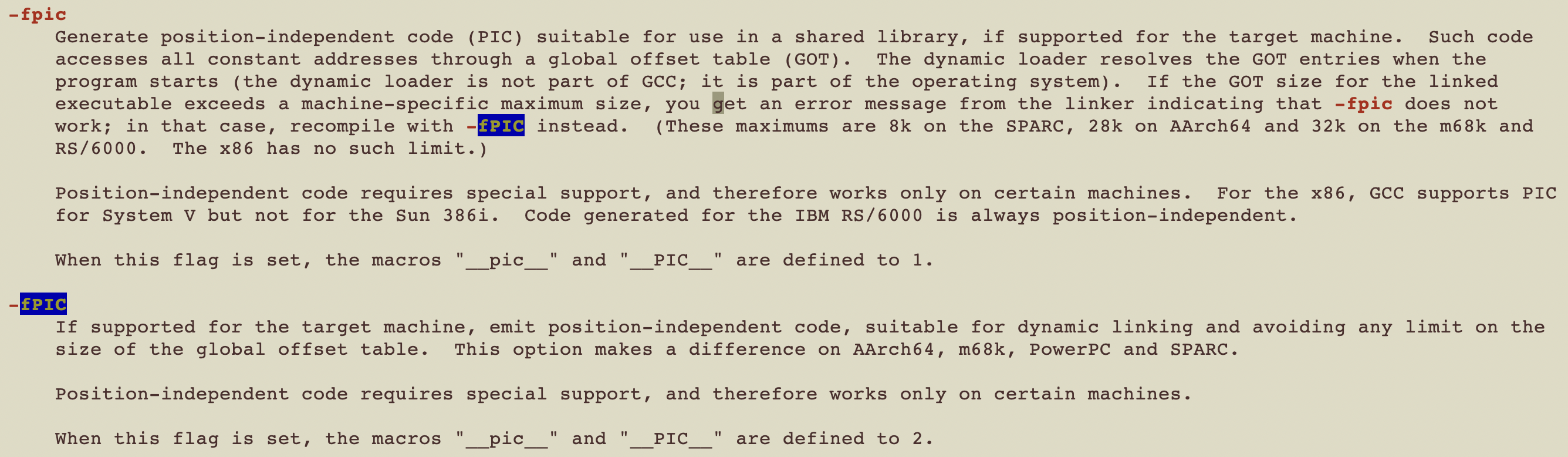
position-independent code(PIC)
暂无
暂无
-M option is designed for auto-generate Makefile rules from g++ command.-E option to STOP after preprocessor during the compilation-w option to DISABLE/suppress all warnings.Using a complex g++ command as an example:
g++ -Wall -Werror -Wno-unknown-pragmas -DPIN_CRT=1 -fno-stack-protector -fno-exceptions -funwind-tables -fasynchronous-unwind-tables -fno-rtti -DTARGET_IA32E -DHOST_IA32E -fPIC -DTARGET_LINUX -fabi-version=2 -faligned-new -I../../../source/include/pin -I../../../source/include/pin/gen -isystem /staff/shaojiemike/Download/pin-3.28-98749-g6643ecee5-gcc-linux/extras/cxx/include -isystem /staff/shaojiemike/Download/pin-3.28-98749-g6643ecee5-gcc-linux/extras/crt/include -isystem /staff/shaojiemike/Download/pin-3.28-98749-g6643ecee5-gcc-linux/extras/crt/include/arch-x86_64 -isystem /staff/shaojiemike/Download/pin-3.28-98749-g6643ecee5-gcc-linux/extras/crt/include/kernel/uapi -isystem /staff/shaojiemike/Download/pin-3.28-98749-g6643ecee5-gcc-linux/extras/crt/include/kernel/uapi/asm-x86 -I../../../extras/components/include -I../../../extras/xed-intel64/include/xed -I../../../source/tools/Utils -I../../../source/tools/InstLib -O3 -fomit-frame-pointer -fno-strict-aliasing -Wno-dangling-pointer
-M inscount0.cpp -o Makefile_bk
In Makefile_bk
inscount0.o: inscount0.cpp \
# sys header
/usr/include/stdc-predef.h \
/staff/shaojiemike/Download/pin-3.28-98749-g6643ecee5-gcc-linux/extras/cxx/include/iostream \
/usr/lib/gcc/x86_64-linux-gnu/11/include/float.h
# usr header
../../../source/include/pin/pin.H \
../../../extras/xed-intel64/include/xed/xed-interface.h \
... more header files
-MM not include sys header file-MF filename config the Makefile rules write to which file instead of to stdout.-M -MG is designed to generate Makefile rules when there is header file missing, treated it as generated in normal.-M -MP will generated M-rules for dependency between header filesheader1.h includes header2.h. So header1.h: header2.h in Makefile-MD == -M -MF file without default option -Efile has a suffix of .d, e.g., inscount0.d for -c inscount0.cpp-MMD == -MD not include sys header file暂无
暂无
上面回答部分来自ChatGPT-3.5,没有进行正确性的交叉校验。
无
导言
电脑玩家经常说RGB是最重要的,对于程序员来说,彩色的terminal有助于快速的分辨输出的有效信息。为此有一些有意思的彩色输出命令。
还有些必备的
a RUST fast version oftdlr
Tips: OpenSSL development headers
get a "failed to run custom build command for openssl-sys" error message. The package is calledlibssl-dev on Ubuntu.
部分支持中文,支持多平台
curl命令直接访问或者交互式awesome-shell里多看看。
set_tsj.sh
oh my zsh : hyq version
虽然这个ohmyzsh好用,但是我用惯了hyq的模板, 从github上下载后解压就安装了zsh模板。(之后可以考虑传到云盘或者cloudflare)
有时候hyq模版有些兼容性问题,比较老的zsh不支持(大约是5.0.2到5.5.1的版本)。这时候只能手动安装了,包括主题和插件。请看zsh一文。
zsh_history 支持多端口同步,实时保存
HISTFILE=~/.zsh_history
SAVEHIST=30000 # 最多 10000 条命令的历史记录
setopt APPEND_HISTORY # 退出 zsh 会话时,命令不会被覆盖式地写入到历史文件,而是追加到该文件的末尾
setopt INC_APPEND_HISTORY # 会话进行中也会将命令追加到历史文件中
setopt SHARE_HISTORY # 所有会话中输入的命令保存到一个共享的历史列表中
export HIST_SAVE_FREQ=10 # 每10次命令保存一次
ulimit -c unlimited
echo '$HOME/core-%e.%p.%h.%t' > /proc/sys/kernel/core_pattern
cd ~
大部分Linux 系统自带的 screen 命令来多终端控制
外部控制:
screen -S namescreen -r namescreen -lsscreen -X -S name kill内部控制:
CtrlA + d 分离CtrlA + x 终端上锁,CtrlA + k 是killCtrlA + S 上下分屏,CtrlA + | 左右分屏。screen -S name创建会话后,需要在新窗口中执行screen来创建额外的终端;这样分屏之后才有两个以上的终端可以使用。CtrlA + w 查看终端CtrlA + [数字] 切换到第几个CtrlA + Tab 返回上一个CtrlA + X 关闭分屏CtrlA + : 进入命令模式,输入resize -v 100或者resize -h 100调整大小。## Install
cd
git clone https://github.com/gpakosz/.tmux.git
ln -s -f .tmux/.tmux.conf
cp .tmux/.tmux.conf.local .
# or
cd ~/resources
# wget https://gitee.com/shaojiemike/oh-my-tmux/repository/blazearchive/master.zip?Expires=1629202041&Signature=Iiolnv2jN6GZM0hBWY09QZAYYPizWCutAMAkhd%2Bwp%2Fo%3D
unzip oh-my-tmux-master.zip -d ~/
ln -s -f ~/oh-my-tmux-master/.tmux.conf ~/.tmux.conf
cp ~/oh-my-tmux-master/.tmux.conf.local ~/.tmux.conf.local
针对不同语言有许多可选插件
### Ubuntu install emacs27
#### 问题:
dpkg-deb: error: paste subprocess was killed by signal (Broken pipe)
Errors were encountered while processing:
/var/cache/apt/archives/emacs27-common_27.1~1.git86d8d76aa3-kk2+20.04_all.deb
E: Sub-process /usr/bin/dpkg returned an error code (1)
版本解决,强制安装 sudo apt-get -o Dpkg::Options::="--force-overwrite" install emacs27-common
### install doom
中文教程 https://www.bilibili.com/read/cv11371146
Install LUA
curl -R -O http://www.lua.org/ftp/lua-5.4.4.tar.gz
tar zxf lua-5.4.4.tar.gz
cd lua-5.4.4
make all test
sudo make install # usr/bin
Install
cd ~/github
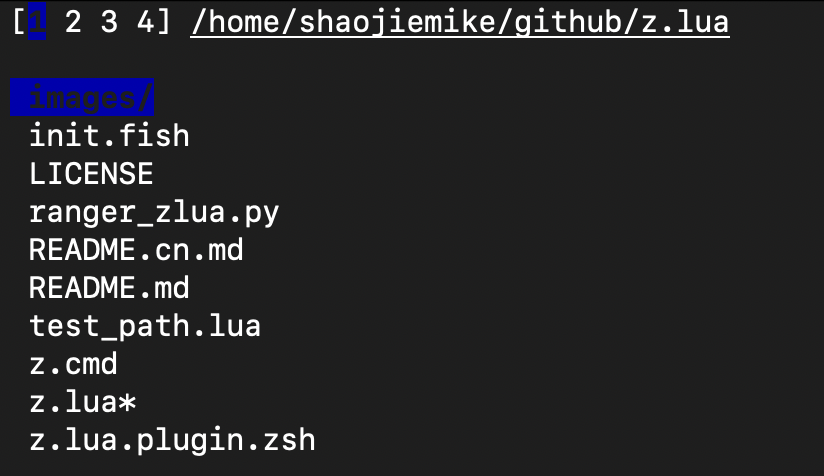
git clone https://github.com/skywind3000/z.lua.git
# vim ~/.zshrc
alias zz='z -c' # 严格匹配当前路径的子路径
alias zi='z -i' # 使用交互式选择模式
alias zf='z -I' # 使用 fzf 对多个结果进行选择
alias zb='z -b' # 快速回到父目录
#eval "$(lua /path/to/z.lua --init zsh)" # ZSH 初始化
eval "$(lua ~/github/z.lua/z.lua --init zsh)"
常用命令
# 弹出栈顶 (cd 到上一次的老路径),和 "z -0" 相同
$ z -
# 显示当前的 dir stack
$ z --
# 交互式
z -i foo # 进入交互式选择模式,让你自己挑选去哪里(多个结果的话)
z -I foo # 进入交互式选择模式,但是使用 fzf 来选择
# 匹配
z foo$
z foo # 跳转到包含 foo 并且权重(Frecent)最高的路径
z foo bar # 跳转到同时包含 foo 和 bar 并且权重最高的路径
z -r foo # 跳转到包含 foo 并且访问次数最高的路径
z -t foo # 跳转到包含 foo 并且最近访问过的路径
z -l foo # 不跳转,只是列出所有匹配 foo 的路径
z -c foo # 跳转到包含 foo 并且是当前路径的子路径的权重最高的路径
z -e foo # 不跳转,只是打印出匹配 foo 并且权重最高的路径
z -i foo # 进入交互式选择模式,让你自己挑选去哪里(多个结果的话)
z -I foo # 进入交互式选择模式,但是使用 fzf 来选择
z -b foo # 跳转到父目录中名称以 foo 开头的那一级
缺点:
rg (Fast & Good multi-platform compatibility) > ag > ack(ack-grep) 🔥
# ripgrep(rg) 但是readme说这样有bugs
sudo apt-get install ripgrep
# 可执行文件 (推荐)
wget https://github.com/BurntSushi/ripgrep/releases/download/13.0.0/ripgrep-13.0.0-x86_64-unknown-linux-musl.tar.gz
tar -zxvf ripgrep-13.0.0-x86_64-unknown-linux-musl.tar.gz
mv ./ripgrep-13.0.0-x86_64-unknown-linux-musl/rg ~/.local/bin
repgrep(rg) 常用选项
--no-ignore 忽略.gitignore之类的文件,也搜索忽略的文件。(默认是不搜索的)-t txt 指定搜索类型rg 'content' ABC/*.cpp搜索和正则ABC/*.cpp匹配的文件find . -name "*xxx*"
# ubuntu
sudo apt install fzf
# GIT install
git clone --depth 1 https://github.com/junegunn/fzf.git ~/.fzf
~/.fzf/install
source ~/.zshrc
# Vim-plugin
Plug 'junegunn/fzf', { 'do': { -> fzf#install() } }
# 使用
fzf --preview 'less {}'
# 安装了bat
fzf --preview "batcat --style=numbers --color=always --line-range :500 {}"
https://github.com/extrawurst/gitui/releases
lazydocker
bash脚本输出颜色文本示例
RED='\033[0;31m'
NC='\033[0m'
# No Color
printf "I ${RED}love${NC} Stack Overflow\n"
echo -e "\033[5;36m Orz 旧容器(镜像)已清理\033[0m"
颜色编号如下
| 颜色 | 编号 |
|---|---|
| Black | 0;30 |
| Dark Gray | 1;30 |
| Red | 0;31 |
| Light Red | 1;31 |
| Green | 0;32 |
| Light Green | 1;32 |
| Brown/Orange | 0;33 |
| Yellow | 1;33 |
| Blue | 0;34 |
| Light Blue | 1;34 |
| Purple | 0;35 |
| Light Purple | 1;35 |
| Cyan | 0;36 |
| Blue | 0;37 |
| Light Cyan | 1;36 |
| Light Gray | 0;37 |
| White | 1;37 |
通过regular expressions自定义高亮各种log文件
install需要 lex
颜色支持(3浅中深 * 6颜色 * 背景色反转)
# 前面 123 是深浅 , 4是下划线
# 字母大写是背景色反转
-r : red -g : green -y : yellow -b : blue -m : magenta -c : cyan -w : white
正则标记log关键词
绿色和红色
-e : extended regular expressions
-i : ignore case
hl -ei -g '(start(|ing|ed))' -r '(stop(|ping|ped))'
## ip 匹配
curl --trace-ascii - www.baidu.com|hl -ei -1R '[0-9]{1,3}\.[0-9]{1,3}\.[0-9]{1,3}\.[0-9]{1,3}'
命令配置文件 hl_ha.cfg
默认设置
export HL_CONF=/staff/shaojiemike/github/hl/config_files
echo $HL_CONF │/staff/shaojiemike/github/hl/config_files
-%c : specifies the beginning of a range colorized in color 'c'
-. : specifies the end of the previous range
Colorize hl configurations :
example Commands
lD # ls by date
lW # ls by week
ifconfig -a | hl --ifconfig
# ping tcpdump fdisk apt-get diff
# ip ibstat iptables passwd
errors
常用方式
在~/.zshrc 里如下配置:
export HL_CONF=/home/shaojiemike/github/hl/config_files
function my_hl(){ hl -eg '\$\{?[A-Z_]+\}?' -ec ' ([A-Z_-]+) ' -eic '(nothing|note)' -eiy ' (-([a-z_-]+))' -eiy '0x[0-9a-z]+' --errors -eig '(yes)' -eir '((^| )no($| ))|(none)|(not)|(null)|(please)|( id )' -ir error -ir wrong -ib '(line)|(file)' -eiy '(warn(|ing))|(wait)|(idle)|(skip)' -im return -ic '(checking)' -eiy ' (__(.*)__) ' -ei1W '((\w*/[.A-Za-z0-9_/-]*[A-Za-z0-9_/-]*)("|$)?)|((\w*/[.A-Za-z0-9_/-]*[A-Za-z0-9_/-]*)(")? ) ' -3B '[0-9][0-9.]+' -3B ' ([0-9])|(#[0-9]+)' -eig '(start(|ing))' -eir '(end(|ing))' }
alias ifconfig='ifconfig | hl --ifconfig'
alias ip='ip a|hl --ip '
alias df='df -h |hl --df'
alias ibstat='ibstat |hl --ibstat'
编译时如此使用make 2>&1|my_hl
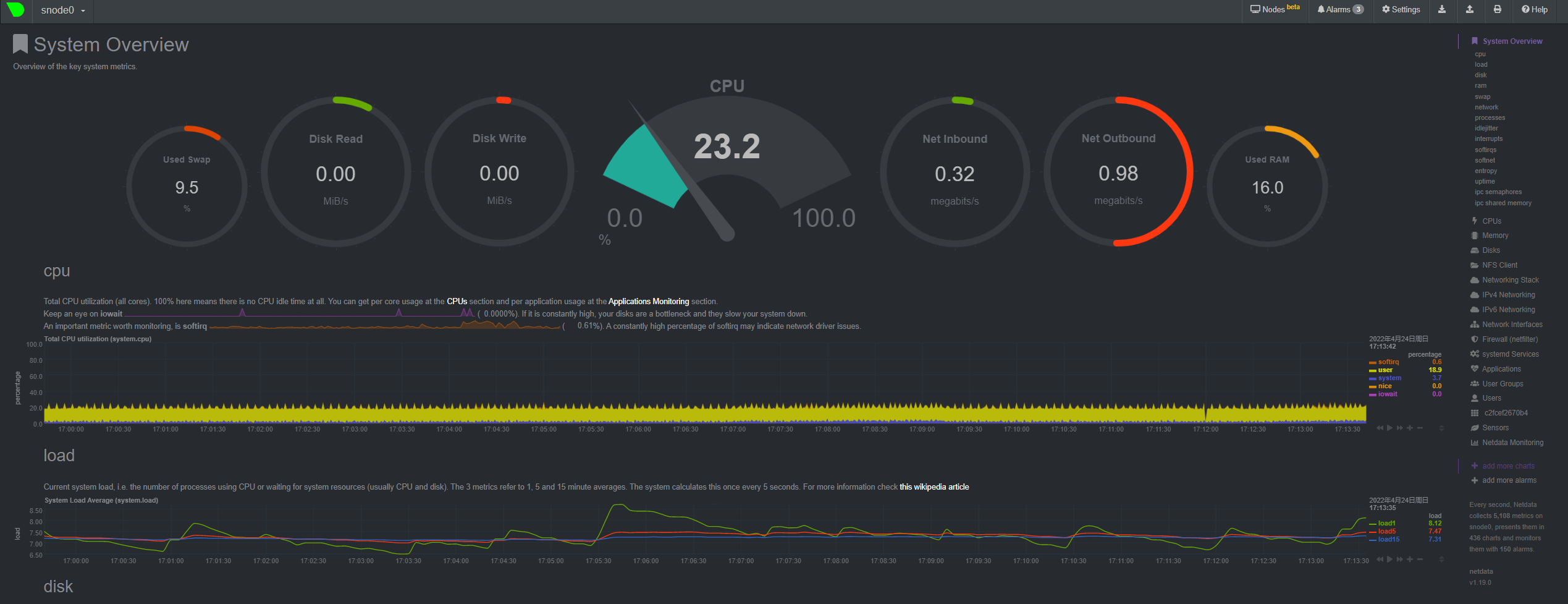
http://127.0.0.1:19999/。想要WebUI运行 sudo netdata -i node5.acsalab.com
# install
curl -LO https://github.com/ClementTsang/bottom/releases/download/0.6.8/bottom_0.6.8_amd64.deb
sudo dpkg -i bottom_0.6.8_amd64.deb
# 使用
btm
类似s-tui可以观察CPU 温度,频率
bmon是类 Unix 系统中一个基于文本,简单但非常强大的网络监视和调试工具
Compile yourself
Install libconfuse
sh wget https://github.com/martinh/libconfuse/releases/download/v2.8/confuse-2.8.zip unzip confuse-2.8.zip && cd confuse-2.8 PATH=/usr/local/opt/gettext/bin:$PATH ./configure make make install Install bmon
sh git clone https://github.com/tgraf/bmon.git cd bmon ./autogen.sh ./configure make make install bmon
https://github.com/jarun/nnn#quickstart
很复杂,插件和快捷键超级多
sh # 版本很低 3.0 sudo apt-get install nnn # Q 退出

https://github.com/ranger/ranger
https://github.com/sayanarijit/xplr
sh cargo install --locked --force xplr
根据教程
/etc:是 Etcetera(等等) 的缩写,这个目录用来存放所有的系统管理所需要的配置文件和子目录。/lib:是 Library(库) 的缩写这个目录里存放着系统最基本的动态连接共享库,其作用类似于 Windows 里的 DLL 文件。几乎所有的应用程序都需要用到这些共享库。/opt:是 optional(可选) 的缩写,这是给主机额外安装软件所摆放的目录。比如你安装一个ORACLE数据库则就可以放到这个目录下。默认是空的。/usr:是 unix shared resources(共享资源) 的缩写,这是一个非常重要的目录,用户的很多应用程序和文件都放在这个目录下,类似于 windows 下的 program files 目录。It's install for all user./var:是 variable(变量) 的缩写,这个目录中存放着在不断扩充着的东西,我们习惯将那些经常被修改的目录放在这个目录下。包括各种日志文件。TODO: during the application install, which locations those app used?
I guess it's usr/bin or /include , opt and /lib
暂无
暂无
上面回答部分来自ChatGPT-3.5,没有进行正确性的交叉校验。
无